![Type=Opposite, State=Logo With Icon, Size=Large-1.png]](https://knowledge.digtective.com/hs-fs/hubfs/Type=Opposite%2c%20State=Logo%20With%20Icon%2c%20Size=Large-1.png?height=40&name=Type=Opposite%2c%20State=Logo%20With%20Icon%2c%20Size=Large-1.png)
Step 1: Access Campaigns in Google Ads
- Log in to you Google Ads account.
- Navigate to Campaigns and locate the Demand Gen Campaign
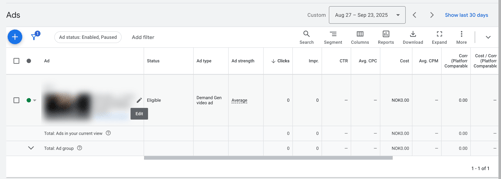
- Click on that Campaign > Ad Group > on to Ad level or the specific advertisement video
Step 2: Add the Dynamic Code on the Ad Level
- Find the "Edit Pen" and click on it
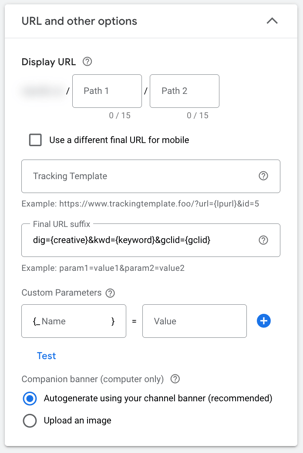
- Copy the tracking code: dig={creative}&kwd={keyword}&gclid={gclid}
- Add the Final URL Suffix
- Save all changes
⚠️ Important: Add the Final URL Suffix only at the Ad level.
If you encounter any issues, feel free to reach out to our support team at support@digtective.com.